
Open, read, switch: what happens inside RAM?

Robot’s RAM Upgrade · Episode 7 of 10

The question: why can two kits with the same CAS delay behave differently?
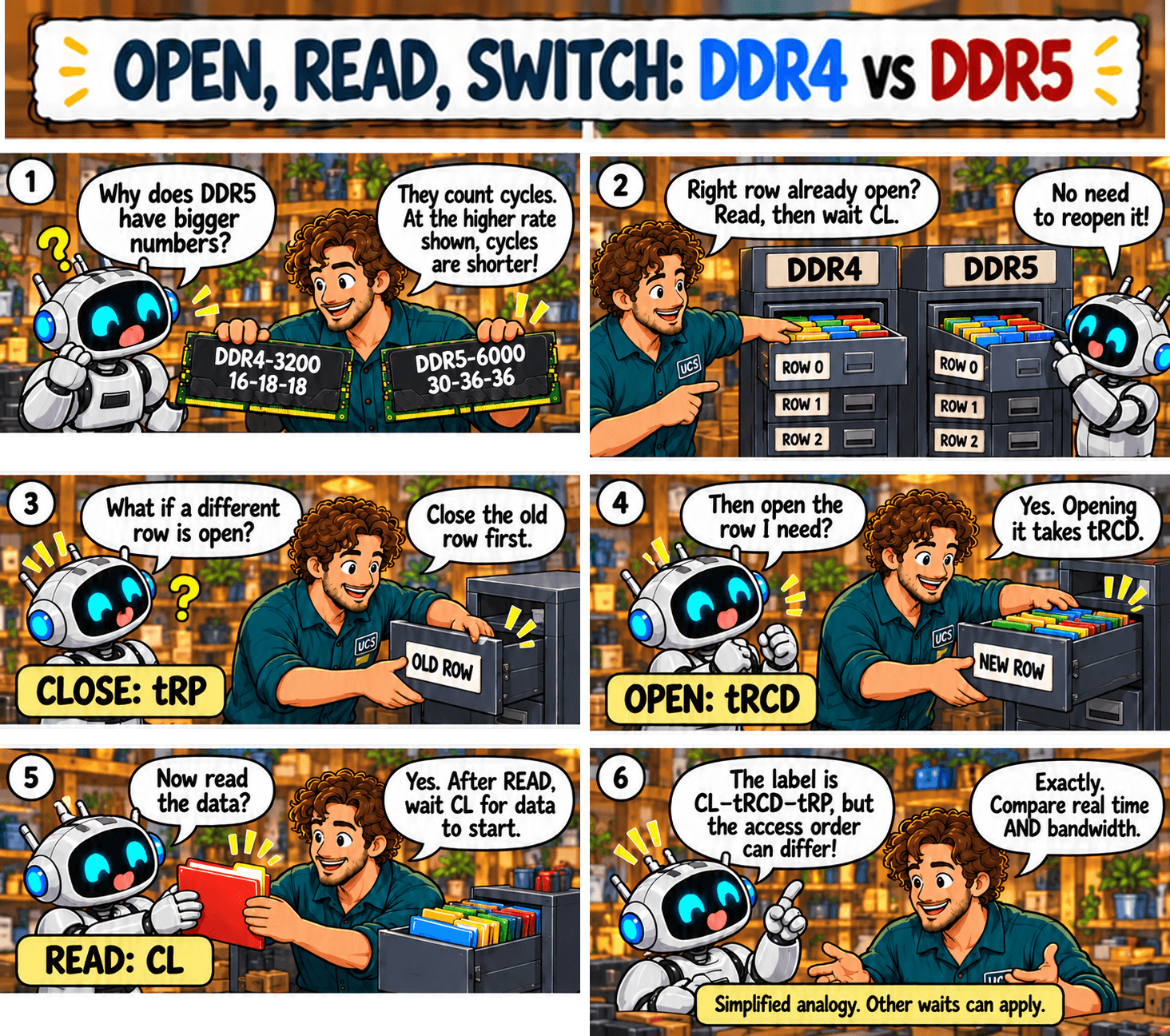
Open, read, switch: what happens inside RAM?
Select the sketch to open it full size.

Quick rule: CAS delay is one of three waits. Compare CL, tRCD and tRP in nanoseconds.
Common mistake: treating CAS delay as the whole memory access time.

What it means

Think of memory as a filing cabinet, where each row of data is a drawer:

  • The right drawer is already open: read the data. The wait is CL.
  • The drawer is closed: open it first (tRCD), then read (CL).
  • A different drawer is open: close it (tRP), open the right one (tRCD), then read (CL).
KitCLtRCDtRP
DDR4-3200 CL16-18-1810 ns11.25 ns11.25 ns
DDR5-6000 CL30-36-3610 ns12 ns12 ns

Both kits have a 10 ns CAS delay, but the DDR5 kit takes slightly longer to open or close a row. Not every read pays all three waits. These figures leave out delays in the CPU and memory controller.

The calculator in Episode 5 converts all three timings to nanoseconds.

What to check

  • CL, tRCD and tRP, not CL alone.
  • How your applications use memory. Some reuse open rows, some jump between them.
  • Measured total latency.

Not sure what fits? Send us your computer model and what you use it for. We check compatibility before you buy.

Ask us to check

All episodes

Sources

General guidance. Check the documentation for your exact hardware before you buy. Full notice.

DDR4 versus DDR5: how much data can my RAM move?

Robot’s RAM Upgrade · Episode 6 of 10

The question: how much more data can DDR5 move than DDR4?

DDR4 versus DDR5: how much data can my RAM move?
Quick rule: GB/s = MT/s × 8 ÷ 1,000 per 64-bit data width. Actual throughput is lower. CL affects waiting, not this peak calculation. These are example rates, not the maximum for either DDR generation.Select the sketch to open it full size.

Quick rule: peak GB/s = MT/s × 8 ÷ 1,000 for each 64-bit memory channel.
Common mistake: assuming DDR5’s two subchannels double the data width or replace dual-channel installation.

What it means

Bandwidth is how much data memory can move each second. Each transfer on a 64-bit channel moves 8 bytes.

KitOne channelTwo channels
DDR4-320025.6 GB/s51.2 GB/s
DDR5-600048 GB/s96 GB/s
  • The ratio follows the transfer rate. 6,000 ÷ 3,200 = 1.875 times the peak bandwidth.
  • At the same MT/s, DDR4 and DDR5 have the same calculated peak.
  • DDR5 splits each module into two 32-bit subchannels. The total is still 64 bits, so bandwidth does not double and you still need modules in both CPU memory channels.
  • These are peak figures for example kits. Real throughput is lower, and CL plays no part in the calculation.

What to check

  • The rated MT/s and the MT/s your system is running at.
  • That both CPU memory channels are populated.
  • Measured bandwidth, and whether your workload needs it.

Not sure what fits? Send us your computer model and what you use it for. We check compatibility before you buy.

Ask us to check

All episodes

Sources

General guidance. Check the documentation for your exact hardware before you buy. Full notice.

Where does the 2,000 come from? One RAM calculation explained

Robot’s RAM Upgrade · Episode 5 of 10

The question: how do I calculate CAS delay, and where does the 2,000 come from?

Where does the 2,000 come from? One RAM calculation explained
CAS delay (ns) = CL × 1,000 ÷ (MT/s ÷ 2) = CL × 2,000 ÷ MT/s. The shortcut works for DDR4 too.Select the sketch to open it full size.

Quick rule: CAS delay in nanoseconds = CL × 2,000 ÷ MT/s.
Common mistake: using the advertised transfer rate as the clock frequency. The clock runs at half that figure.

What it means

The 2,000 is 2 × 1,000:

  • The 2: DDR means double data rate. Memory sends data twice per clock cycle, so the clock speed in MHz is half the MT/s figure. DDR5-6400 runs a 3,200 MHz clock.
  • The 1,000: a 1 MHz clock has a cycle of 1,000 nanoseconds (ns), so cycle time in ns = 1,000 ÷ MHz.
  • Together: 1,000 ÷ (MT/s ÷ 2) = 2,000 ÷ MT/s.

Worked example, DDR5-6400 CL32:

  • Clock speed: 6,400 ÷ 2 = 3,200 MHz
  • Cycle time: 1,000 ÷ 3,200 = 0.3125 ns
  • CAS delay: 32 × 0.3125 = 10 ns
  • Shortcut: 32 × 2,000 ÷ 6,400 = 10 ns

The same shortcut works for DDR4.

RAM timing calculator

Enter the numbers from a kit’s label. Add a second kit to compare. Leave any timing blank if the label does not list it.

Kit A
Kit B (optional)

The calculator converts label numbers into time. It does not predict how fast your applications will run.

What to check

  • The transfer rate in MT/s.
  • CL in clock cycles.
  • That your result is in nanoseconds.

Not sure what fits? Send us your computer model and what you use it for. We check compatibility before you buy.

Ask us to check

All episodes

Sources

General guidance. Check the documentation for your exact hardware before you buy. Full notice.
MT/s, CL and CAS delay: transfers, ticks or time?

Robot’s RAM Upgrade · Episode 4 of 10

The question: is a higher MT/s or a lower CL the better buy?

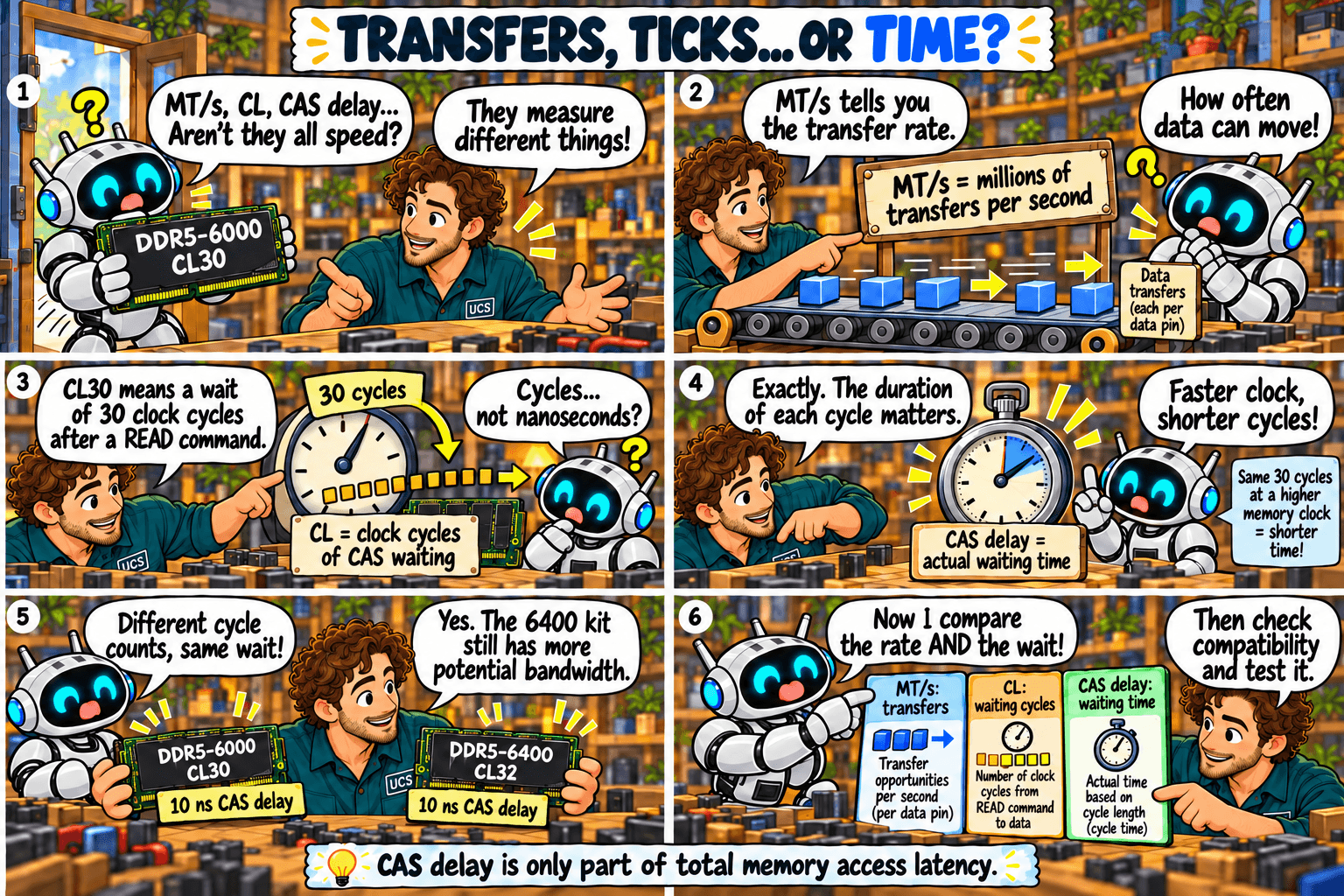
MT/s, CL and CAS delay: transfers, ticks or time?
CAS delay is only part of total memory access latency.Select the sketch to open it full size.

Quick rule: compare MT/s and CL together. Convert CL to nanoseconds before comparing kits of different speeds.
Common mistake: assuming CL32 must be slower than CL30.

What it means

The three terms measure different things:

  • MT/s: millions of transfers per second. It is how often data can move. Higher is faster.
  • CL: CAS latency. CAS is “column address strobe”, the signal that tells the memory which column of data to read. CL is the number of clock cycles the memory waits between a read command and the first data.
  • CAS delay: the same wait measured in nanoseconds (ns). It is not a second, separate delay.

Faster memory has shorter cycles, so a higher CL on a faster kit can be the same wait.

KitCycle timeCAS delay
DDR4-3200 CL160.625 ns10 ns
DDR5-6000 CL300.333 ns10 ns
DDR5-6000 CL360.333 ns12 ns
DDR5-6400 CL320.3125 ns10 ns
  • Same wait, more data. DDR5-6400 CL32 and DDR5-6000 CL30 both wait 10 ns, and the 6400 kit can move more data per second.
  • At the same MT/s, lower CL is faster. DDR5-6000 CL30 beats DDR5-6000 CL36 by 2 ns.
  • CAS delay is one part of total access time. Use it to compare kits, not to predict application speed.

Episode 5 shows the calculation.

What to check

  • Both MT/s and CL, never one alone.
  • The CAS delay in nanoseconds.
  • Benchmarks of your applications on a comparable CPU.

Not sure what fits? Send us your computer model and what you use it for. We check compatibility before you buy.

Ask us to check

All episodes

Sources

General guidance. Check the documentation for your exact hardware before you buy. Full notice.
RAM labels explained: capacity, MT/s and timings

Robot’s RAM Upgrade · Episode 3 of 10

The question: which numbers on a memory kit help me choose the right upgrade?

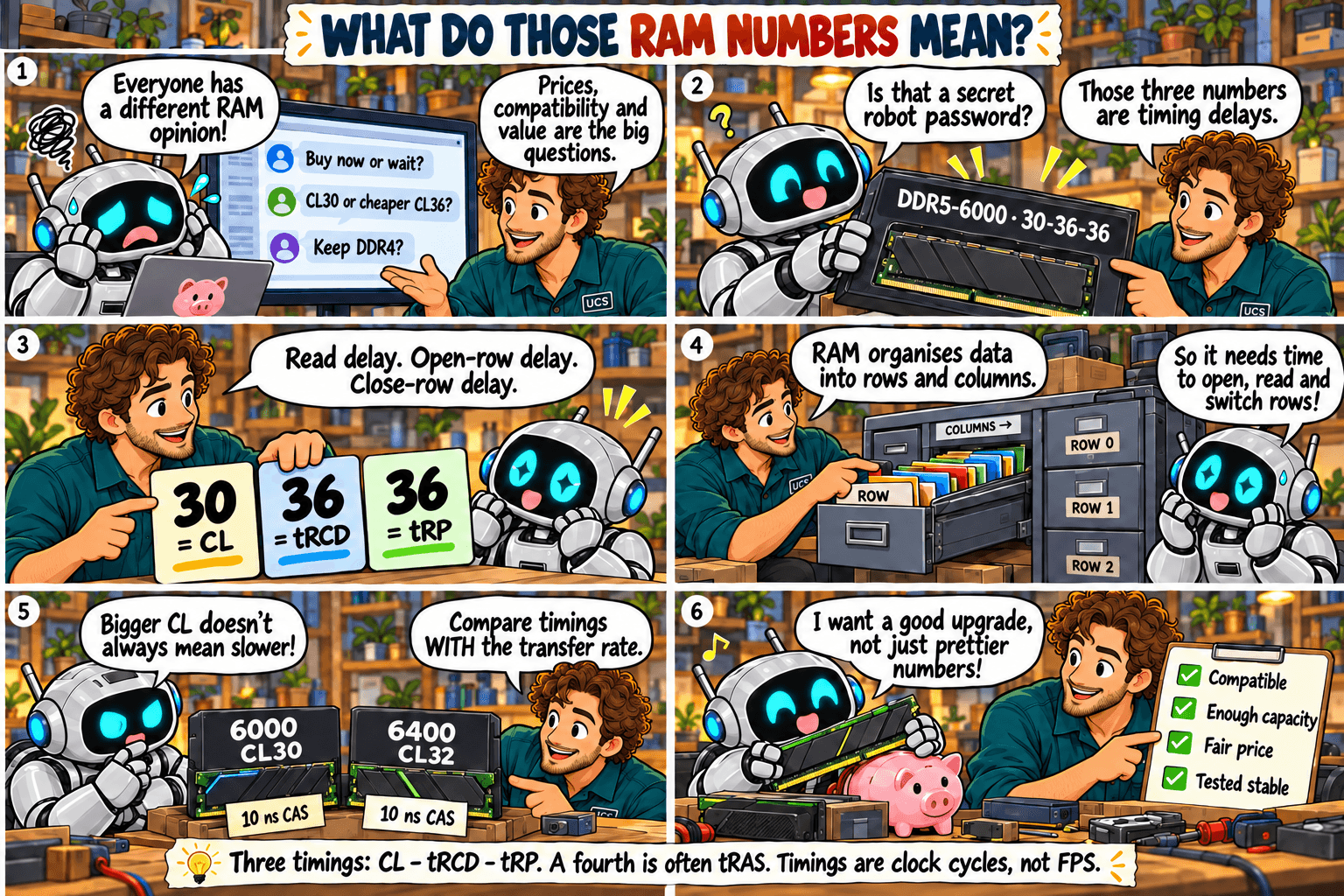
What do those RAM numbers mean? Decode the label
Three timings: CL, tRCD and tRP. A fourth is often tRAS. Timings are clock cycles, not FPS.Select the sketch to open it full size.

Quick rule: check capacity and compatibility first. Then compare MT/s and timings together, never one alone.
Common mistake: choosing the lowest CL alone, or assuming the speed on the box is active after installation.

What it means

Take the label 32 GB (2 × 16 GB), DDR4-3200, CL16-18-18:

  • 32 GB: total capacity of the kit.
  • 2 × 16 GB: two modules of 16 GB each.
  • DDR4: the memory generation. It must match your motherboard.
  • 3200: the transfer rate in MT/s (megatransfers per second). Higher is faster.
  • CL16: CAS latency, the wait before data is returned, counted in clock cycles.
  • 18-18: two further timings (tRCD and tRP), also in clock cycles. Some kits list a fourth, tRAS.

Timings count clock cycles, not time: DDR4-3200 CL16 and DDR5-6000 CL30 both wait 10 nanoseconds. Episodes 4 and 5 explain why.

What to check

  • Total capacity and kit layout, such as 2 × 16 GB.
  • The generation and exact kit against your motherboard’s documentation.
  • MT/s and CL together, plus the voltage and profile the kit needs.
  • Slot placement in the motherboard manual. More sticks do not mean more memory channels.
  • The speed your system is running at. The advertised XMP or EXPO speed is off until you enable it in the BIOS. Run a memory test afterwards.

Not sure what fits? Send us your computer model and what you use it for. We check compatibility before you buy.

Ask us to check

All episodes

Sources

Technical review: 5 October 2026. General guidance. Check the documentation for your exact hardware before you buy. Full notice.
Can you keep your DDR4 when upgrading your PC?

Robot’s RAM Upgrade · Episode 2 of 10

The question: can I reuse my existing RAM when I change the CPU or motherboard?

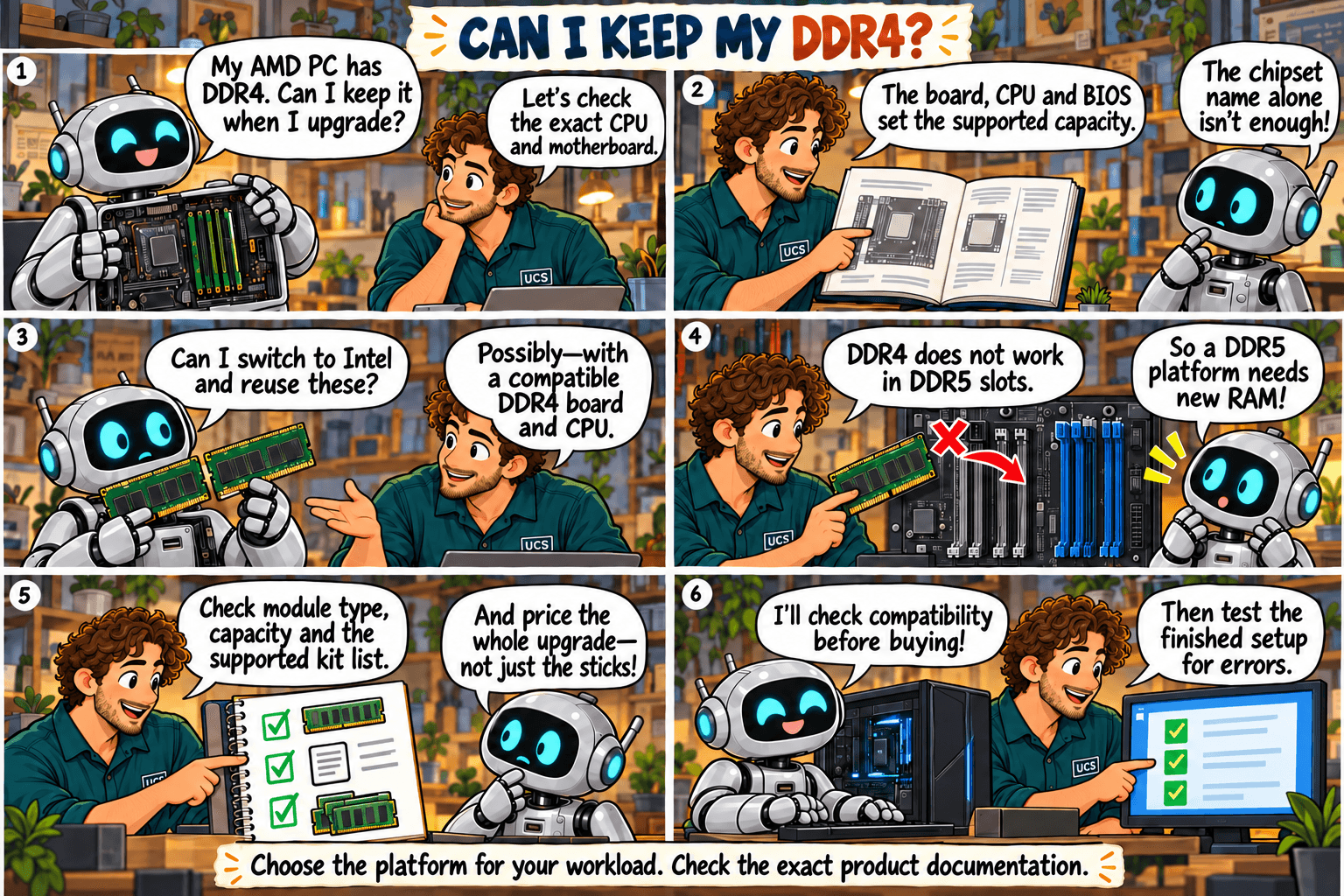
Can I keep my DDR4? The CPU and motherboard upgrade puzzle
Choose the platform for your workload. Check the exact product documentation.Select the sketch to open it full size.

Quick rule: reuse DDR4 only if the new motherboard and CPU both support your exact modules.
Common mistake: assuming the same DDR generation guarantees compatibility, or that switching CPU brand gives you more memory capacity.

What it means

  • DDR4 does not fit a DDR5 slot. The two generations use different slots and voltages.
  • The CPU brand does not settle it. Some Intel platforms support DDR4, but only on a DDR4 motherboard.
  • Moving from an AMD DDR4 desktop to a DDR5 one means new RAM, plus a new CPU and motherboard.
  • Maximum capacity is set by the CPU, motherboard and BIOS together. The chipset name alone does not tell you.
  • Server memory (registered) does not work in ordinary desktops.

What to check

  • Identify the exact CPU and motherboard models, not just the brand or chipset.
  • Check DDR generation, module type, capacity per module and total capacity.
  • Read the motherboard’s memory support list (QVL) and BIOS notes. The list shows tested kits and may not cover every kit that works.
  • Check which BIOS version is required before you buy.
  • Compare the total cost of CPU, motherboard and RAM against keeping your current system.

Our recommendation

Keep your DDR4 if a supported upgrade handles your workload at a lower total cost. Otherwise buy a tested CPU, motherboard and RAM combination.

Not sure what fits? Send us your computer model and what you use it for. We check compatibility before you buy.

Ask us to check

All episodes

Sources

Technical review: 5 October 2026. General guidance. Check the documentation for your exact hardware before you buy. Full notice.